Amazon Redshift upsert-merge loading mode options
Data Integration provides three distinct options when selecting the Upsert-Merge loading mode option in Amazon Redshift.
Use the Upsert-Merge option to update existing data in a table that may have changed in the source since the last run, as well as insert new records. While all three Upsert-Merge options produce this effect, they differ in their backend processes and have performance implications.
Switch–Merge
The Switch Merge method in Amazon Redshift is a way of merging data from two or more tables or streams into a single table or stream. It works by creating a new table or stream that contains the data from the other tables, and then updating the references to point to the new table. This is useful for:
Updating data in a table: By using the switch merge method, you can easily update the data in a table by replacing it with new data from another table.
Consolidating data from different tables: If you have data spread across tables, the Switch Merge method consolidates it into a single table.
Performing Upsert operations: The Switch Merge method performs upsert operations, which insert new rows into a table or stream if they do not exist, or update existing rows if they do.
Switch-Merge method
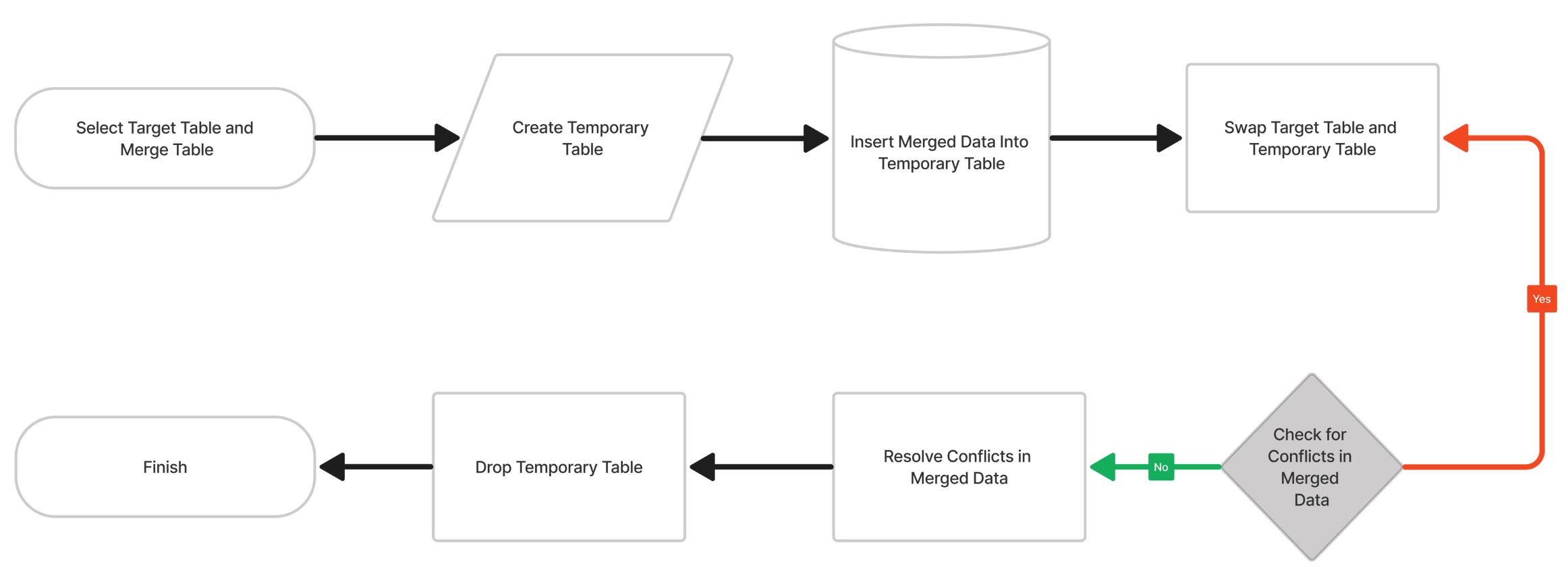
Procedure
-
Select target table and merge table: Choose the target table to update and the source (merge) table that holds the data to merge.
-
Create temporary table: Create a temporary table to hold the merged data.
-
Insert merged data into temporary table: Insert the data from the merge table into the temporary table.
-
Swap target table and temporary table: Swap the original target table with the temporary table that contains the merged data.
-
Check for conflicts in merged data: Identifies any conflicts or errors in the merged data.
-
Resolve conflicts in merged data: Resolves any conflicts or errors.
-
Drop temporary table: Drop the temporary table once not needed.
-
Finish: Complete the process, making the merged table the current table.
Switch-Merge example
In Amazon Redshift, the MERGE statement enables you to update or insert data into a table, depending on whether the data already exists. Use the SWITCH statement to control the order in which the platform executes the WHEN MATCHED and WHEN NOT MATCHED clauses in the MERGE statement.
Here is an example of how you could use the SWITCH and MERGE statements together in Amazon Redshift:
CREATE TABLE my_table (
 id INTEGER,
  data VARCHAR
);

INSERT INTO my_table (id, data)
VALUES (1, 'A'), (2, 'B'), (3, 'C');

-- Update rows with even id
MERGE INTO my_table t
USING (
  SELECT id, 'X' as data
  FROM my_table
  WHERE id % 2 = 0
) s
ON t.id = s.id
WHEN MATCHED THEN
  UPDATE SET t.data = s.data
WHEN NOT MATCHED THEN
  INSERT (id, data) VALUES (s.id, s.data);

-- Update rows with odd id
SWITCH
  WHEN id % 2 = 1 THEN
    MERGE INTO my_table t
    USING (
      SELECT id, 'Y' as data
      FROM my_table
      WHERE id % 2 = 1
 ) s
    ON t.id = s.id
    WHEN MATCHED THEN
      UPDATE SET t.data = s.data
    WHEN NOT MATCHED THEN
      INSERT (id, data) VALUES (s.id, s.data);
END
In this example, use the SWITCH statement to select between two blocks of MERGE statements. The first MERGE statement updates rows with even ID values, and the second MERGE statement, executed when the SWITCH condition meets the criteria, updates rows with odd ID values.
In cases of Switch-Merge (or other fallbacks to Switch-Merge due to schema changes), the system replaces the target table. When replacing the target table, re-grant the original table's permissions.
Delete-Insert
The DELETE-INSERT method in Amazon Redshift enables you to update a table by deleting outdated rows and then adding new rows with the updated data. This method is helpful when you want to replace all the data in a table rather than only changing a few rows or columns.
The Delete-Insert approach offers advantages, including the fact that it does not require a unique match key and it can accommodate metadata changes—such as column renaming or data-type changes—without generating errors.
Delete-Insert method

- Begin transaction: This step begins a new transaction, which lets you execute SQL statements as a single unit of work. Use these Transactions to ensure data integrity and consistency.
- Delete rows in target table: In this step, the platform deletes all rows in the target table that match the condition specified in the WHERE clause.
- Insert new rows: In this step, the platform inserts new rows into the target table.
- Commit transaction: This step commits the transaction, which makes the changes made during the transaction permanent.
Delete-Insert example
Here is an example of how to use the DELETE-INSERT method in Amazon Redshift:
BEGIN;

DELETE FROM my_table WHERE id = 123;
INSERT INTO my_table (id, col1, col2) VALUES (123, 'new_val1', 'new_val2');

COMMIT;
In this example, the platform deletes any rows in my table with an ID of 123. Inserts a new row with the revised values for col1 and col2.
Using the DELETE-INSERT method to alter data in a table can take longer than using an UPDATE statement because it deletes and reinserts data, which consumes more resources than updating existing rows. When you need to fully replace the data in a table, this method is useful.
Merge
Based on whether the row already exists or not, the MERGE command lets you update or add rows to tables. Used to insert data into a table or update an existing one.
Merge method

- Identify the Target Table: This table receives the data from the source table during the merge.
- Find the source table: This table holds the data to merge into the target table.
- Determine the merge condition: This condition specifies which rows from the source table should merge into the target table.
- Execute the merge: This step performs the actual merge operation, using the target table, source table, and merge condition specified in the previous steps. The merge operation will insert any rows from the source table that do not exist in the target table and update any rows in the target table that match the merge condition with the corresponding rows from the source table.
Merge example
Here is an example of how to use the Merge method in Amazon Redshift:
MERGE INTO target_table t
USING (SELECT * FROM source_table WHERE column1 = 'value1') s
ON t.primary_key = s.primary_key
WHEN MATCHED THEN UPDATE SET t.column2 = s.column2
WHEN NOT MATCHED THEN INSERT (t.primary_key, t.column2) VALUES (s.primary_key, s.column2);
In this example, the MERGE statement updates the column2 value in the target_table for rows that have a matching primary_key value in the source_table. For rows in the source_table that do not have a matching primary_key value in the target_table, the MERGE statement inserts these rows into the target_table.